Q.
How can I turn off the Sign-in email notification?
You can turn off the Sign-in email notification from My Account or add an external account sign-in
Only users that have created a BOOK☆WALKER account with their email address, will receive the sign-in email notification.
*User who registered with an external account, such as Google, will not receive sign-in notifications.
When you sign in to BOOK☆WALKER with your email address and password, we will send an email with the following subject to your registered email address to notify you of the date and time of your sign in and your IP address.
Subject:BOOK☆WALKERログイン通知(BOOK☆WALKER sign-in notification)
If you do not wish to receive notification email
There are two methods.
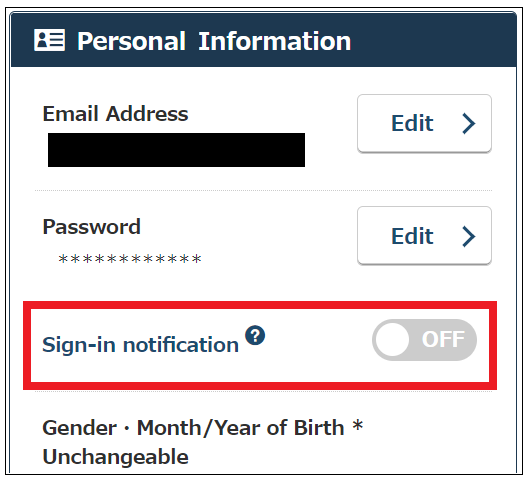
Turn off Sign-in notification
- Access “My Account”
- Turn “Sign in notification” off under “Personal Information”
Link your external account with BOOK☆WALKER
If you link your email address created BOOK☆WALKER account with your external account and use the external account sign-in option, a sign-in notification email will not be send.
For details please refer to the following FAQ page: How can I add another sign-in method?
*Once you have linked your login with an external account , you will not be able to unlink it.
If you have received a notification without signing in your account
Someone may have accessed your account.
Please reset your password in the following steps and contact us using our “Contact Us” form.
Please reset your password as follows:
- Access “Reset password” page
- Input your registered email address and submit
- You will receive a Password Assistance email
Sent from: noreply@bookwalker.jp
Subject: [BOOK☆WALKER] パスワード再発行のご案内 / Password Assistance - Click the URL in the email, fill out your birth year/month as well as your gender
The URL to reset your password is valid for 24 hours.
Further information can be found in our FAQ: I forgot my password
 FAQ
FAQ